This page has links for Sermons on Ephesians from Tommy Nelson.
They are in MP3 format.

The following information is written on the CD (from which the files were copied):
EPHESIANS MP3

24 Messages
Complete Series
Tom Nelson
Media Ministry
of Denton Bible Church
Denton Bible Church
2300 E. University Dr.
Denton, Tx 76209
Toll Free 1 866 DBC TAPES (322 8273)
Local 940 297 6750
www.dbcmedia.org
Committed to the biblical task of
"equipping of the saints for the work of the ministry, to the building up of the body of Christ"
Ephesians 4:12
DUPLICATION FOR RESALE PROHIBITED,

DUPLICATION FOR MINISTRY PURPOSES ENCOURAGED


Links below are MP3 audio sermons, see Instructions below the links table

359-012190-Ephesians1 369-040190-Ephesians9 383-070890-Ephesians17
360-012890-Ephesians2 372-042290-Ephesians10 384-071590-Ephesians18
362-021190-Ephesians3 373-042990-Ephesians11 385-072290-Ephesians19
364-022590-Ephesians4 374-050690-Ephesians12 387-080590-Ephesians20
365-030490-Ephesians5 375-051390-Ephesians13 389-081990-Ephesians21
366-031190-Ephesians6 376-052090-Ephesians14 390-082608-Ephesians22
367-031890-Ephesians7 377-052790-Ephesians15 391-090290-Ephesians23
368-032590-Ephesians8 382-070190-Ephesians16 392-090990-Ephesians24

Instructions

If using Internet Explorer:

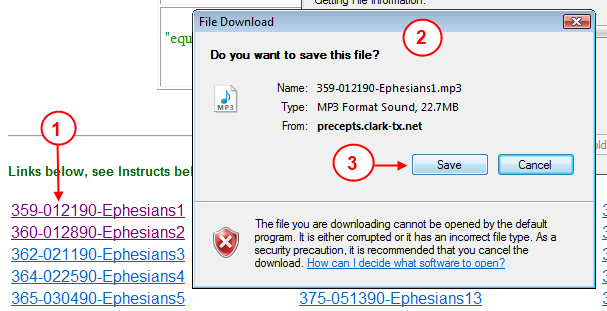
  1. Click on a link to save it to your computer.
  2. A dialog box will appear for saving to your computer.
  3. Click the Save button.


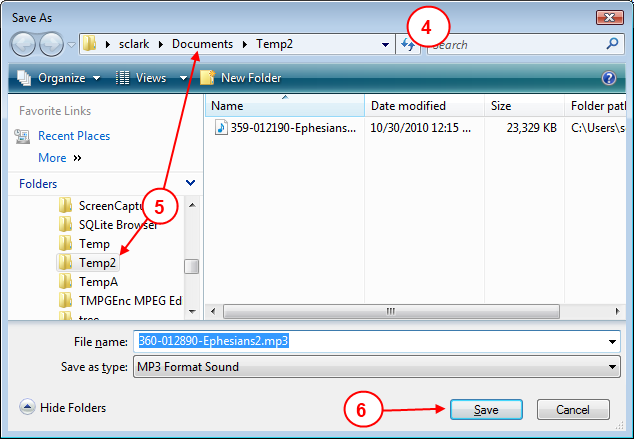
  4. A file save dialog box will appear.
  5. Select the Folder that you want to save your audio file into.
  6. Click the Save button.


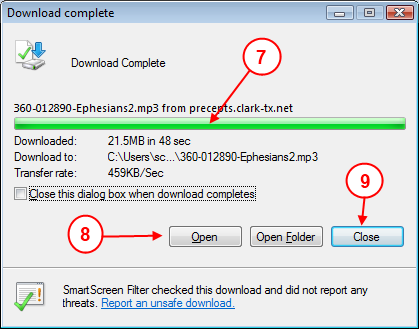
  7. You will see a dialog box open showing you the progress. When the download is complete the green bar will be complete and the message will show Download Complete.
  8. If you want to listen to the file now you can click on Open and windows will play the file.
  9. Or you can click on Close and later find the file on your computer (remember where you put it in step #5) and double click on it to listen to it.


If using FireFox:

  1. Click on a link to listen to it in your browser


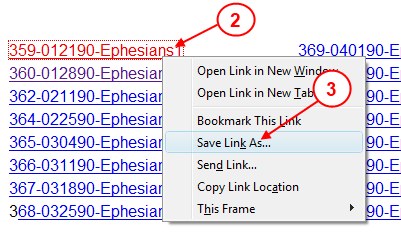
  2. Or to save the file on your computer, Right click on a link that you want to save to your computer
  3. In the pop-up box, click on Save Link As...


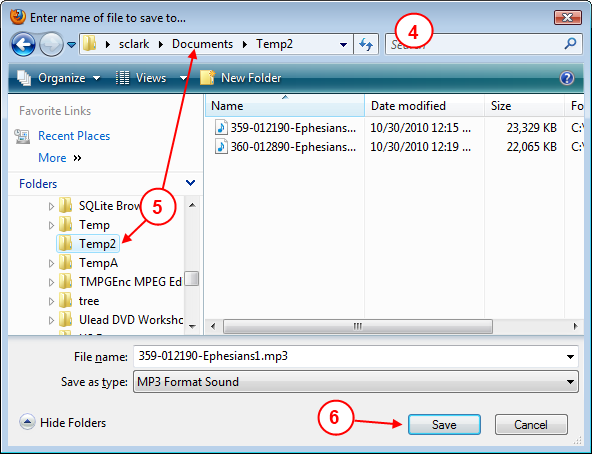
  4. A save dialog box will appear.
  5. Select the Folder that you want to save your audio file into.
  6. Click on the Save button.


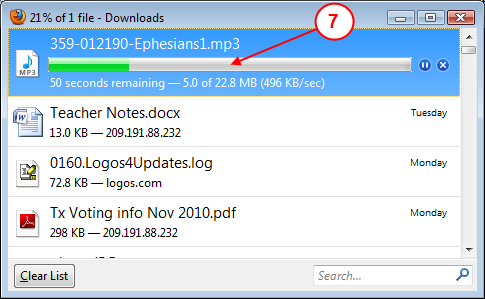
  7. FireFox will show a dialog box showing you the download progress.
    When the download is complete, you will find the file where you saved it in step #5.
  8. You can double click on the file on your computer to listen to it.